
Advanced QA tools QA mode off
Advanced QA tools are hidden by default so the first impression stays focused on Moen / premium competitor insights. Enable QA mode only when reviewing or correcting overlay placement and product matching.
Overlay editing
Turn on QA mode, then right-click any visible overlay box to move it, add another overlay with the same label, delete it, or send a product mismatch signal.
Saved browser edits
Coordinate moves, added boxes, and deletes are saved in this browser until cleared. Use the reset button to return to the original overlay set.
Export QA state
Download the current edited overlay JSON if coordinates or product-matching fixes need to be preserved outside the browser.
Download updated JSONMoen / premium competitor focused suggestions
Suggestions now use refreshed Home Depot price, rating, review count, and price-status data.M1: Best practical Moen move
Test Moen EX100C beside the visible GXP50C. GXP50C anchors entry at $99.00, while EX100C creates a clear premium step at $199.00. Both show 4.4/5 ratings; EX100C has 213 reviews and a stronger premium feature story.
M3: Moderate Moen move
Use Moen EX75C as the lower-friction trade-up. At $154.99, with 4.4/5 and 723 reviews, it is a cleaner midpoint between GXP50C and EX100C.
premium competitor value flank
premium competitor is not detected in this photo, but L-3200 at $93.19, 4.5/5, and 149 reviews is a value-flank benchmark against Moen GXP50C and Project Source.
Other useful medal concepts to test later
- Best Value: lowest live price with rating ≥4.3 and at least 100 reviews.
- Highest Visibility: strongest shelf visibility score regardless of reviews.
- Most Differentiated Moen/premium competitor Target: best balance of price gap, review count, and competitor adjacency.
- Needs QA: product/page mismatch, stale Home Depot pricing, or low-confidence shelf tag read.
- Stocking Risk: high-review product with weak visible package/stock linkage.
Product classification QA update
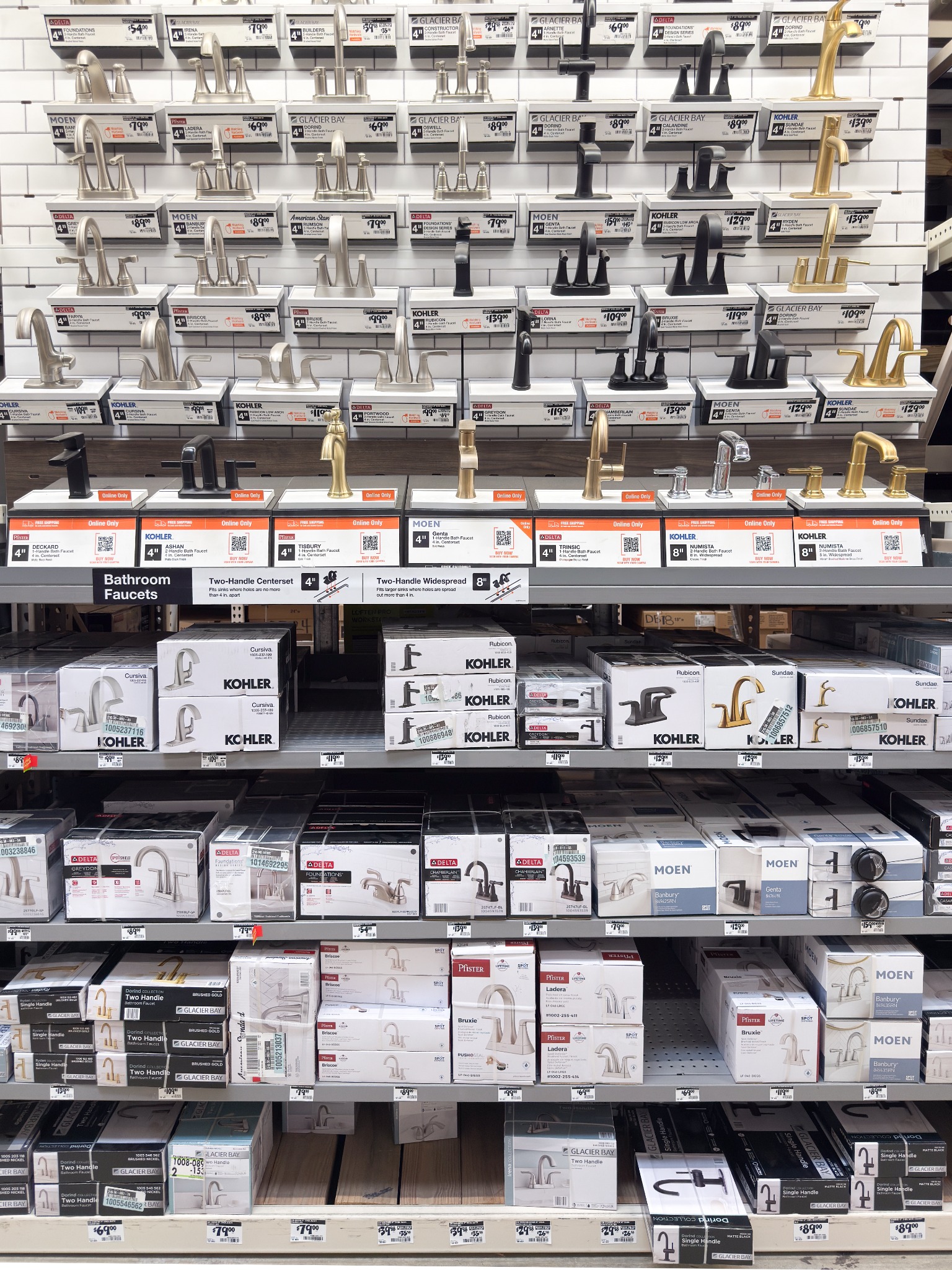
Home Depot faucet display / boxed-inventory separationUpdated: this page was rebuilt from the original ShelfLens template. The source image remains native 1536 × 2048, display faucets are separated from boxed inventory, visible pricing/mentionables are restored, and exact models/SKUs are not guessed when unreadable.
Product data — photo classification + Home Depot validation links
All mapped display and boxed-inventory groups; exact model/SKU is conservative unless readable on the shelf/package.| # | Image | Brand | Product / model | Home Depot item/search | Price / status | Image price label | Observed inventory | Location | Rating | Reviews | Visibility | Review medal | Moen suggestion + est. bay % | Link |
|---|
Planogram mentionables
| Tag | Type | Mentionable | Visibility | Note |
|---|
Moen opportunity target slots
| Tag | Slot | Product / model | Home Depot item/search | Price | Rating | Reviews | Practicality / Strategic / Bay % | Suggestion | Link |
|---|
Historical, facing, and availability charts
Placeholder historical data until more shelf photos are added. Brand colors stay consistent across charts.Historical share of shelf — stacked bar placeholder
Share of shelf = percentage of visible product overlay space occupied by brand. Previous photo values are placeholders; current photo uses live overlay area.
Facings by brand — line chart
Counts visible product facings/slots by brand. Current point updates from active overlays; previous points are placeholders.
Shelf availability — key brands
Green = visible sellable package/facing. Yellow = display/slot visible but no box visible, or not present in this bay. Image-based proxy only.
Standalone displays / feature space flags
Special displays are tracked separately from sellable product facings.
Brand Adjacencies
Moen is the starting brand. Hover any brand around the wheel or in the list to re-center the adjacency view from that brand.
Pricing label categories from photo
Image-based read of shelf-price cues. Product pages supply current price; this layer classifies visible in-photo pricing/signage cues.
Picture location classification
Separates the main set from feature/display placements like hanging signs, side clips, and quarter pallets.
Heatmap method note
Layout guidance to keep this clean
Layout and platform improvement notes
Neutral benchmark notes for keeping the Moen-facing demo clean and usefulWhat a scaled retail-intelligence workflow would add
- Multi-store ingestion and recurring photo capture across retailers.
- Historical bay comparison, item-master validation, and store-level execution checks.
- Inventory and POS joins to convert image proxies into sales, margin, and stockout truth.
- Role-based dashboards for category, sales, shopper insights, and retail execution teams.
What this ShelfLens page does well
- Fast single-bay storytelling tied to a named store, retailer, bay, and brand objective.
- Clickable overlays tied to Home Depot product pages, ratings, reviews, price/status, thumbnails, and Moen suggestions.
- Editable QA workflow, mismatch signals, dynamic Excel export, heatmap, share-of-shelf, and adjacency views.
- Best suited for a targeted account conversation and planogram hypothesis discussion.
Layout / styling recommendations
- Keep Preserve native image size plus the right-side strategy panel for label review and demos.
- Simplify Keep editing/admin controls inside Advanced QA tools.
- Clarify Label heatmap as an estimated shopper-attention proxy, not eye tracking.
- Focus Keep top-page KPIs to Moen share, display/boxed split, pricing cues, and best target slot.
- Trust Add confidence chips: Home Depot page verified, shelf-tag read, geometry QA, price/review timestamp.